
289 lines
7.6 KiB
Markdown
289 lines
7.6 KiB
Markdown
## Doris 4.0 安装配置文档
|
||
|
||
### 一、安装$JDK17$
|
||
|
||
```shell
|
||
cd /usr/local
|
||
wget https://download.oracle.com/java/17/archive/jdk-17.0.12_linux-x64_bin.tar.gz
|
||
|
||
tar -xvzf jdk-17.0.12_linux-x64_bin.tar.gz
|
||
rm -rf jdk-17.0.12_linux-x64_bin.tar.gz
|
||
mv /usr/local/jdk-17.0.12/ /usr/local/jdk17
|
||
|
||
# 增加内容
|
||
cat >> /etc/profile << EOF
|
||
export JAVA_HOME=/usr/local/jdk17
|
||
export PATH=$JAVA_HOME/bin:$PATH
|
||
export CLASSPATH=.:$JAVA_HOME/lib/dt.jar:$JAVA_HOME/lib/tools.jar
|
||
EOF
|
||
|
||
source /etc/profile
|
||
```
|
||
|
||
### 二、下载$Doris 4.0$
|
||
|
||
```shell
|
||
# 下载安装包
|
||
cd /usr/local
|
||
wget https://apache-doris-releases.oss-accelerate.aliyuncs.com/apache-doris-4.0.2-bin-x64.tar.gz
|
||
|
||
# 解压到当前目录
|
||
tar -zxvf apache-doris-4.0.2-bin-x64.tar.gz
|
||
|
||
# 移动到目标位置
|
||
mv apache-doris-4.0.2-bin-x64 /usr/local/doris
|
||
|
||
# 删除安装包
|
||
rm -rf apache-doris-4.0.2-bin-x64.tar.gz
|
||
```
|
||
|
||
### 三、修改系统配置
|
||
|
||
```shell
|
||
#!/bin/bash
|
||
# Doris 系统配置一键设置脚本
|
||
# 需要以 root 权限执行
|
||
|
||
set -e
|
||
|
||
echo "========== 开始配置 Doris 系统参数 =========="
|
||
|
||
# 1. 设置文件描述符限制(当前会话生效 + 永久生效)
|
||
echo "1. 设置文件描述符限制..."
|
||
cat >> /etc/security/limits.conf << EOF
|
||
# Doris 配置 - 文件描述符限制
|
||
* soft nofile 65536
|
||
* hard nofile 65536
|
||
EOF
|
||
|
||
# 当前会话生效
|
||
ulimit -n 65536
|
||
echo "当前会话文件描述符限制已设置为: $(ulimit -n)"
|
||
|
||
# 2. 关闭 Swap(立即生效 + 永久生效)
|
||
echo "2. 关闭 Swap..."
|
||
# 立即关闭
|
||
swapoff -a
|
||
|
||
# 永久关闭 - 注释掉 fstab 中的 swap 行
|
||
sed -i '/swap/s/^/#/' /etc/fstab
|
||
echo "Swap 已关闭并永久禁用"
|
||
|
||
# 3. 设置虚拟内存区域限制(立即生效 + 永久生效)
|
||
echo "3. 设置虚拟内存区域限制..."
|
||
# 永久生效
|
||
if ! grep -q "vm.max_map_count" /etc/sysctl.conf; then
|
||
echo "vm.max_map_count=2000000" >> /etc/sysctl.conf
|
||
fi
|
||
|
||
# 立即生效
|
||
sysctl -w vm.max_map_count=2000000
|
||
|
||
# 重新加载 sysctl 配置
|
||
sysctl -p
|
||
|
||
# 4. 验证设置
|
||
echo "4. 验证配置..."
|
||
echo "============================="
|
||
echo "当前文件描述符限制: $(ulimit -n)"
|
||
echo "Swap 状态:"
|
||
free -m | grep -i swap
|
||
echo "max_map_count 当前值: $(cat /proc/sys/vm/max_map_count)"
|
||
echo "============================="
|
||
|
||
echo "✅ 所有配置已完成!"
|
||
echo "注意:文件描述符限制对新会话生效,如需当前会话完全生效,请重新登录。"
|
||
```
|
||
|
||
**使用方法**
|
||
|
||
1. **保存为脚本文件**
|
||
|
||
```bash
|
||
vi /root/doris_system_config.sh
|
||
```
|
||
|
||
将上面的内容粘贴进去,保存退出。
|
||
|
||
1. **赋予执行权限**
|
||
|
||
```bash
|
||
chmod +x /root/doris_system_config.sh
|
||
```
|
||
|
||
1. **以 root 用户执行**
|
||
|
||
```bash
|
||
sudo /root/doris_system_config.sh
|
||
```
|
||
|
||
**脚本功能说明**
|
||
|
||
| 功能 | 立即生效 | 永久生效 | 验证命令 |
|
||
| :------------- | :----------------------------------- | :------------------------------- | :------------------------------- |
|
||
| 文件描述符限制 | `ulimit -n 65536` | 写入 `/etc/security/limits.conf` | `ulimit -n` |
|
||
| 关闭 Swap | `swapoff -a` | 注释 `/etc/fstab` 中 swap 行 | `free -m` |
|
||
| 虚拟内存限制 | `sysctl -w vm.max_map_count=2000000` | 写入 `/etc/sysctl.conf` | `cat /proc/sys/vm/max_map_count` |
|
||
|
||
**注意事项**
|
||
|
||
1. **执行权限**:必须以 root 用户执行,或使用 sudo
|
||
2. **会话限制**:文件描述符限制对新登录会话生效,当前会话可使用 `ulimit -n 65536` 临时设置
|
||
3. **系统重启**:脚本执行后无需重启系统,所有配置立即生效且永久保存
|
||
4. **兼容性**:适用于 CentOS/RHEL 7+、Ubuntu 18.04+ 等主流 Linux 发行版
|
||
|
||
|
||
|
||
### 四、部署$FE$节点
|
||
|
||
```shell
|
||
cd /usr/local/doris/fe/conf
|
||
vi fe.conf
|
||
```
|
||
|
||
```properties
|
||
# For jdk 17, this JAVA_OPTS will be used as default JVM options
|
||
JAVA_OPTS_FOR_JDK_17="-Dfile.encoding=UTF-8 -Djavax.security.auth.useSubjectCredsOnly=false -Xmx8192m -Xms8192m -XX:+HeapDumpOnOutOfMemoryError -XX:HeapDumpPath=$LOG_DIR -Xlog:gc*,classhisto*=trace:$LOG_DIR/fe.gc.log.$CUR_DATE:time,uptime:filecount=10,filesize=50M --add-opens=java.base/java.nio=ALL-UNNAMED --add-opens java.base/jdk.internal.ref=ALL-UNNAMED --add-opens java.base/sun.nio.ch=ALL-UNNAMED --add-opens java.xml/com.sun.org.apache.xerces.internal.jaxp=ALL-UNNAMED"
|
||
|
||
|
||
# 设置大小写敏感,建议调整为 1,即大小写不敏感。
|
||
lower_case_table_names = 1
|
||
|
||
## 网络 CIDR,根据网络 IP 地址指定。在 FQDN 环境中可以忽略
|
||
priority_networks = 10.10.14.0/24
|
||
|
||
## 建议 Doris 使用独立于操作系统的 JDK 环境
|
||
JAVA_HOME = /usr/local/jdk17
|
||
```
|
||
|
||
**启动 $FE$ 进程**
|
||
|
||
```shell
|
||
cd /usr/local/doris/fe
|
||
bin/start_fe.sh --daemon
|
||
tail -f log/fe.out
|
||
|
||
# 使用默认端口
|
||
dnf install mariadb -y
|
||
mysql -uroot -P9030 -h127.0.0.1
|
||
|
||
# 查看 FE 的状态
|
||
show frontends;
|
||
```
|
||
|
||
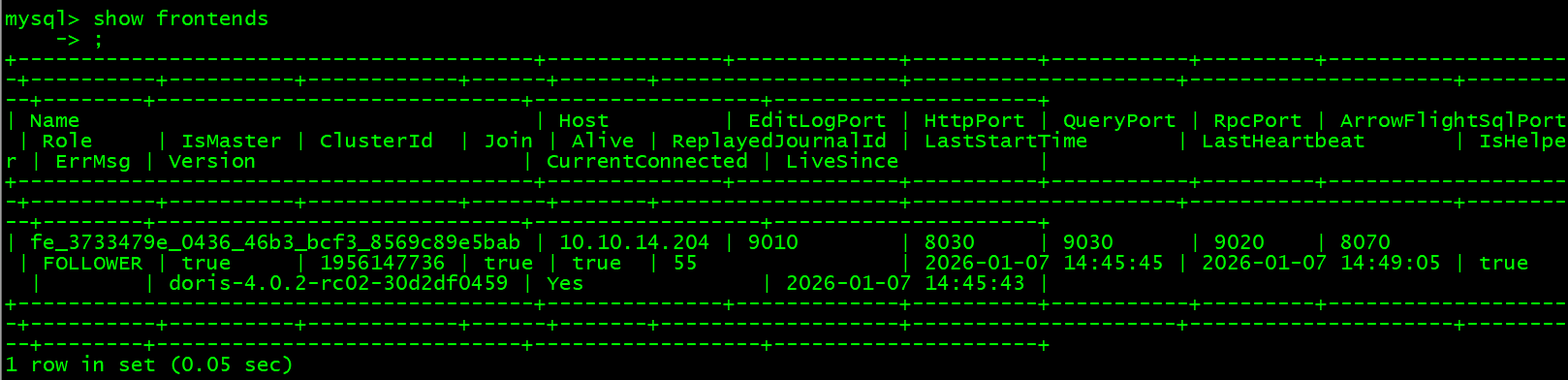
通常要确认以下几项
|
||
|
||
- $Alive$ 为 `true` 表示节点存活;
|
||
|
||
- $Join$ 为 `true` 表示节点加入到集群中,但不代表当前还在集群内(可能已失联);
|
||
|
||
- $IsMaster$ 为 true 表示当前节点为 Master 节点。
|
||
|
||
|
||
|
||
|
||
### 五、部署$BE$ 节点
|
||
|
||
- **修改 $BE$ 配置文件**
|
||
|
||
```shell
|
||
vi /usr/local/doris/be/conf/be.conf
|
||
```
|
||
|
||
```properties
|
||
# 根据网络 IP 地址指定
|
||
priority_networks = 10.10.14.204/24
|
||
|
||
# 使用独立于操作系统的 JDK 环境
|
||
JAVA_HOME = /usr/local/jdk17
|
||
```
|
||
|
||
- **关闭大页文件**
|
||
|
||
临时解决方案(立即生效,重启后失效):
|
||
|
||
```
|
||
echo madvise | sudo tee /sys/kernel/mm/transparent_hugepage/enabled
|
||
```
|
||
|
||
永久解决方案(重启后依然生效):
|
||
|
||
```bash
|
||
# 编辑 /etc/rc.local 或创建 systemd 服务
|
||
echo 'echo madvise > /sys/kernel/mm/transparent_hugepage/enabled' | sudo tee -a /etc/rc.local
|
||
chmod +x /etc/rc.local
|
||
```
|
||
|
||
- **启动 $BE$ 进程**
|
||
|
||
```shell
|
||
cd /usr/local/doris/be
|
||
bin/start_be.sh --daemon
|
||
|
||
tail -f /usr/local/doris/be/log/be.out
|
||
```
|
||
|
||
- **在 $Doris$ 中注册 $BE$ 节点**
|
||
|
||
```shell
|
||
# connect a alive FE node
|
||
mysql -uroot -P9030 -h127.0.0.1
|
||
|
||
# register BE node
|
||
ALTER SYSTEM ADD BACKEND "10.10.14.204:9050";
|
||
|
||
# 查看状态
|
||
show backends;
|
||
```
|
||
|
||
### 六、测试
|
||
|
||
```sql
|
||
-- check the current user
|
||
SELECT CURRENT_USER();
|
||
|
||
-- modify the password for current user
|
||
SET PASSWORD = PASSWORD('DsideaL147258369');
|
||
```
|
||
|
||
```sql
|
||
-- create a test database
|
||
create database testdb;
|
||
create database yltcharge;
|
||
|
||
-- create a test table
|
||
CREATE TABLE testdb.table_hash
|
||
(
|
||
k1 TINYINT,
|
||
k2 DECIMAL(10, 2) DEFAULT "10.5",
|
||
k3 VARCHAR(10) COMMENT "string column",
|
||
k4 INT NOT NULL DEFAULT "1" COMMENT "int column"
|
||
)
|
||
COMMENT "my first table"
|
||
DISTRIBUTED BY HASH(k1) BUCKETS 32
|
||
PROPERTIES (
|
||
"replication_num" = "1" -- 设置副本数为 1
|
||
);
|
||
|
||
-- insert data
|
||
INSERT INTO testdb.table_hash VALUES
|
||
(1, 10.1, 'AAA', 10),
|
||
(2, 10.2, 'BBB', 20),
|
||
(3, 10.3, 'CCC', 30),
|
||
(4, 10.4, 'DDD', 40),
|
||
(5, 10.5, 'EEE', 50);
|
||
|
||
-- check the data
|
||
SELECT * from testdb.table_hash;
|
||
+------+-------+------+------+
|
||
| k1 | k2 | k3 | k4 |
|
||
+------+-------+------+------+
|
||
| 3 | 10.30 | CCC | 30 |
|
||
| 4 | 10.40 | DDD | 40 |
|
||
| 5 | 10.50 | EEE | 50 |
|
||
| 1 | 10.10 | AAA | 10 |
|
||
| 2 | 10.20 | BBB | 20 |
|
||
+------+-------+------+------+
|
||
```
|
||
|